AI Marvels - AI Photo & Video
- 3.3
- Rating
- 5.00M
- Installs
- Free
- Price

 Analysis by App-foxy
I approached AI Marvels - AI Photo & Video as a practical photography app rather than a replacement for a full desktop editor. Its appeal is immediate: it brings AI-based transformations, animated photo effects, cartoon and anime looks, and everyday editing into one mobile workspace. After spending time with that mix, my view is that it is most useful when I want a quick, playful result without building an edit from scratch.
The app is free to install, although it includes in-app purchases ranging from $1.99 to $89.99 per item. That makes the real decision less about whether I can try it and more about whether its particular style of AI tools fits the way I create. Someone who enjoys experimenting with faces, short clips, and stylized portraits will find more to explore here than someone looking for precise color correction, professional retouching, or a simple camera replacement.
How I Decide Whether AI Marvels Is Worth Keeping
I decide whether to keep AI Marvels by asking how often its distinctive transformations solve a real creative need, rather than counting effects I might try once. I also weigh whether the results feel worth the time spent choosing and checking them, especially when a conventional edit would be quicker. That practical test leads naturally to the question of which people are most likely to enjoy using it.
You May Also Like

 Blood Strike: 2.5 Anniversary
Blood Strike’s Loadouts Turn Every Drop Into a Tactical Gamble
A close look at Blood Strike’s custom loadouts: how fast access to signature weapons reshapes its battle royale rhythm, rewards preparation, and narrows the gap between fights.

 Pandora - Music & Podcasts
Pandora’s Music Is Easy to Start, but Harder to Recover
Pandora’s strength is its low-effort path from a seed to a station. Its weak spot is how much confidence it asks you to place in connection, setup, and quiet recovery.

 8 Ball Pool
 Is Built on Rivalries, Rematches, and Routine
A close look at the rivalries, rematches, shared routines, and unanswered safety questions that turn a quick pool match into a persistent mobile community.

 Samsung Music
’s Quiet Strength Is Playing What You Already Own
Its reach comes less from spectacle than from dependable access to a personal library. That simplicity is both the app’s strongest retention engine and its ceiling.

 AccuWeather: Weather Radar
AccuWeather Review: A Quick, Clear Forecast for Everyday Decisions
For everyday plans, the best forecast is the one you can understand quickly. AccuWeather makes rain timing, radar, and local conditions easy to act on, with a few trade-offs.

 Hill Climb Racing
Why Hill Climb Racing Still Turns Crashes Into One More Run
A tiny car, a bumpy hill and one more upgrade: Hill Climb Racing keeps resurfacing because its simple chaos makes every near-miss feel personal.
More From Our News Desk



The first question is what kind of result you want
My starting point with any creative app is the intended finish. If I need a clean family photo, a carefully cropped product image, or a controlled adjustment to exposure and color, I usually prefer a conventional photo editor. Those apps make their strengths obvious: sliders, selections, layers, and repeatable adjustments. AI Marvels takes a different route. It is built around transformation, so the interesting question is not “How do I perfect this image?” but “What could this image become?”
That distinction matters because AI effects can be entertaining while still being unpredictable. A cartoon treatment may produce a charming portrait, but it may also alter small facial details that I wanted to preserve. A dance or hug animation can turn a still image into something shareable, yet the result is more about the surprise of motion than about photographic accuracy. I would choose this app for creative exploration first and technical control second.
It is easy to start, but the choice of source matters
For the best first impression, I would not begin with a dark, blurry, or heavily cropped picture. AI transformations have more visual information to work with when the subject is well lit, faces are clear, and the main person is not partly hidden. That is a simple workflow change, but it makes a noticeable difference: choose a straightforward portrait before testing the more dramatic effects, then compare the result with a second image instead of judging the app from one difficult file.
I also recommend keeping the original photo untouched. The creative output should be treated as a new version, not as a replacement for the source. That is especially useful when an effect changes facial proportions, clothing details, or the background. I found that the app makes the most sense when I use it to create an alternate shareable version while keeping the unedited image available for normal use.
Who will get the most from it
This is a good match for people who post casual visual content, make playful greetings, or want to give an old portrait a new presentation. It can also suit families who want to experiment with a still image of relatives, provided everyone is comfortable with the result. The age rating is Everyone, which makes the app broadly approachable, though the usual common sense still applies when using someone else’s face or sharing an AI-generated clip.
I would be more cautious about recommending it to photographers who need a consistent visual identity. If every image must retain exact skin texture, hair shape, clothing, and lighting, AI Marvels may feel too loose. It is also not my first choice for a long-form video project, where a timeline, detailed audio controls, and fine-grained clip editing are usually more important than a collection of quick transformations.
Where the app stands in the mobile photography category
AI Marvels comes from HitPaw and sits in the photography category, but its scope stretches beyond static pictures. The combination of photo editing, live-photo-style movement, cartoon and anime filters, and AI hug and dance videos gives it a broader creative range than a basic filter camera. In my experience, that breadth is its central advantage and its central compromise: there is plenty to try, but the app is less focused than a tool designed for only one job.
The product has reached over five million installs, which suggests that its quick, effect-led approach has found a sizeable audience. Its average rating is 3.3 from around twenty-three thousand ratings, so I would not treat popularity as proof that every workflow is smooth. I read that combination as a reason to try the free experience personally before paying for regular access.
Where it wins over ordinary alternatives
The strongest part of the app is the distance between idea and result. In a traditional editor, turning a portrait into a stylized image can involve several manual steps: masking the subject, applying a visual treatment, adjusting the background, and exporting a finished file. Here, the attraction is that the creative direction is already packaged into an effect. I can move from a normal portrait to something more expressive without learning a complicated editing system.
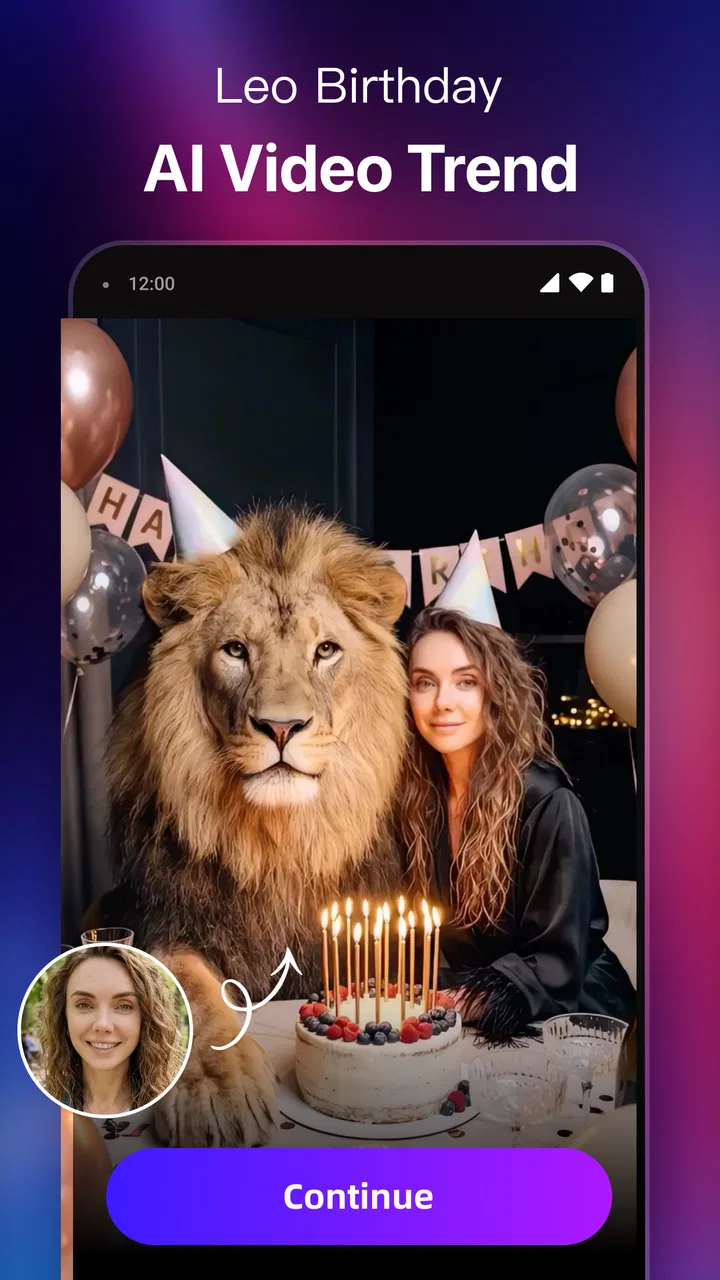
The animated options are another meaningful difference. A normal filter changes the appearance of a still image, while an AI hug or dance concept tries to create a small visual moment from it. That is useful for a birthday message, a private joke, or a social post where a static portrait would feel too ordinary. I would not call every result equally convincing, but the format itself gives the app a reason to exist beside standard editors.
The cartoon and anime treatments are also more useful when I think of them as mood-setting tools rather than faithful portraits. They can help me test different visual identities for a profile image, create a playful illustration from a travel photo, or make a themed image for a conversation. The best results are often the ones where a little imperfection adds character instead of making the output look like a formal portrait.
A practical everyday scenario
Imagine I want to send a quick birthday message to a friend after finding an old photo of us. In a conventional editor, I might crop it, add text, and stop there. With this app, I can first try a cartoon or anime treatment, then test whether an animated hug-style result makes the message feel more personal. I would save the version that looks natural enough to share and keep the original in my gallery.
The important part of that workflow is restraint. I would not create ten nearly identical versions and send all of them. I would choose one clear source image, preview a small number of styles, and compare the outputs at full size before sharing. AI effects can look impressive in a tiny preview but reveal odd edges or altered facial details when viewed closely.
Three techniques that improve the experience
First, I use the app as a two-stage process: exploration followed by selection. I try the expressive effect first, then inspect the result for identity, composition, and unwanted changes. This prevents the novelty of motion or a strong filter from making me overlook a distracting face or distorted background.
Second, I prepare images for the effect instead of assuming every photo is equally suitable. A single subject against a reasonably uncluttered background gives the transformation a clearer target. For group photos, I would test carefully because several faces and overlapping bodies create more opportunities for an animation or stylization to look awkward.
Third, I separate “share now” edits from “keep forever” edits. For a temporary social post, a surprising visual change may be exactly what I want. For a profile picture or family archive, I would use a lighter treatment or a traditional editor that preserves more control. This small distinction helps me enjoy the app without expecting every output to become a permanent image.
What may make alternatives a better fit
Someone who mainly wants manual editing should compare this app with a conventional mobile photo editor. I would choose the conventional option for precise cropping, controlled retouching, exposure work, or a repeatable editing recipe. Those tools are usually easier to trust when the goal is correction rather than transformation. AI Marvels can complement that workflow, but it does not remove the need for a more exact editor.
For serious video creation, a dedicated mobile video editor may also be the better choice. AI Marvels is attractive when the video begins with a photo and the effect itself is the main event. It is less compelling when I need to arrange many clips, fine-tune timing, balance sound, or build a detailed narrative. The category label may be photography, but the presence of animated results should not be mistaken for a full video-production environment.
There is also a creative preference involved. Some users enjoy seeing an image transformed in a dramatic way; others dislike AI-generated changes because they can make a personal photo feel less authentic. If preserving the exact expression, texture, and proportions of the original person is essential, I would skip the stronger effects and use a restrained editor instead. That is not a flaw unique to this app, but it is a real trade-off at the heart of its design.
Privacy and sharing require personal judgment
Whenever I use a face-based creative tool, I think beyond the visual result. I choose images that I am comfortable processing through a creative service, and I ask permission before turning another person’s portrait into a humorous animation or sharing it publicly. The Everyone rating describes the app’s broad content suitability, not a guarantee that every use of another person’s image is appropriate.
I also preview an exported result before posting it. An effect that looks harmless in the editor may communicate something different when viewed without context. This is particularly important for animated hugs, dances, or other actions, because the motion can change the tone of a portrait. A private joke between friends may not be understood the same way by a wider audience.
Free access, paid choices, and the cost of switching
The free price makes experimentation straightforward, but the presence of paid items means I would avoid subscribing or purchasing immediately. I would first test the kinds of effects I actually expect to use, check whether the free workflow is enough for occasional projects, and only then consider spending money. The listed purchase range runs from $1.99 to $89.99 per item, a wide spread that makes it especially important to understand what a purchase unlocks before confirming it.
My advice is to judge value by frequency, not by the number of effects visible on the screen. If I create one playful image every few months, a free option or a normal editor may be sufficient. If I regularly make animated greetings, stylized portraits, or short social clips, the convenience could justify paying for the tools I use repeatedly. I would still compare the result with a dedicated alternative before committing to the highest-priced option.
Switching away from AI Marvels is easy when my projects are occasional because the app’s role is usually complementary. I can keep ordinary editing in another tool and return here for an AI transformation. The switching cost becomes higher only when I build a personal routine around its particular effects or when I need to recreate a look that depends on the app’s presets. For that reason, I would save original photos and exported results in an organized folder rather than relying on the app as the only place where my creative work exists.
Current compatibility and what to expect
The app requires Android 8.0 or later, so it is available to many Android users while still excluding older devices. Its current version is 2.17.0. I would check compatibility before planning to use it on an older phone, especially because AI image and video processing can feel more demanding than a basic filter. A newer device is not a guarantee of perfect results, but a capable phone generally makes previewing and exporting more comfortable.
Because the app combines several kinds of creative processing, I would also give each export time and avoid judging performance from a single quick tap. The practical experience depends on the source image, the selected effect, and the phone. If I were preparing content for a deadline, I would create and inspect it earlier rather than waiting until the last minute. That is a sensible habit for any effect-based editor, but it matters more when the result is generated rather than manually adjusted.
My recommendation after weighing the trade-offs
AI Marvels - AI Photo & Video is worth trying if you want a playful AI photography app that can move beyond ordinary filters. I like its ability to turn a familiar portrait into a cartoon, anime-style image, or short animated concept without demanding advanced editing skills. The combination makes it particularly suitable for casual sharing, greetings, profile experiments, and one-off creative ideas.
I would not recommend it as the only photo tool on your phone. For accurate corrections, professional-looking retouching, or structured video editing, a focused alternative will usually serve you better. I would also avoid paying until the free experience proves that its specific effects fit your habits. The average rating of 3.3 and the broad range of optional purchase prices reinforce my preference for testing before committing.
HitPaw’s app is at its best when I approach it with the right expectation: not a magic replacement for photography technique, but a fast playground for turning still images into something unexpected. If that sounds like the kind of creativity you want, install it, start with a clear portrait, keep the original, and judge each result at full size. If your priority is control and consistency, choose a traditional editor instead and treat this one as an occasional source of visual surprises.
FAQs for AI Marvels - AI Photo & Video
01What is AI Marvels - AI Photo & Video, and what can I do with it?
AI Marvels - AI Photo & Video is a creative editing app designed to transform ordinary photos and videos with artificial-intelligence effects. Depending on the tools available in your version, you may be able to create stylized portraits, apply artistic filters, enhance images, animate pictures, generate visual variations, or produce short AI-based video effects. It is mainly aimed at casual creators who want quick results without advanced editing experience.
02Is AI Marvels - AI Photo & Video free to download and use?
The app may be free to download, but some of its most attractive features can be restricted by in-app purchases, credits, subscriptions, advertisements, or daily usage limits. Before starting an effect, check the pricing screen carefully, especially if the app offers a free trial. Also review the renewal terms in Google Play or the App Store, because deleting the app does not automatically cancel an active subscription.
03Do I need an internet connection to use AI Marvels - AI Photo & Video?
Most AI-powered functions usually require an internet connection because your selected photo or video may need to be processed on remote servers. Basic browsing or previously saved results might remain available offline, but generation, enhancement, and video transformation tools can fail without a stable connection. Wi-Fi is recommended when working with large files, since uploads and downloads may consume considerable mobile data.
04Is AI Marvels - AI Photo & Video safe for uploading personal photos and videos?
Users should review the app’s privacy policy before uploading sensitive material. AI editing services may process files on external servers, temporarily store content, or collect technical and usage information to operate and improve their features. Avoid uploading confidential documents, private images, children’s photos, or anything you would not want processed by a third-party service unless you are comfortable with the stated data practices and permissions.
05What should I do if an AI effect produces a poor result or the export does not work?
AI results can vary depending on image quality, lighting, facial visibility, background complexity, and the chosen style. For better results, use a clear, well-lit original with the subject centered and avoid heavily compressed files. If processing fails, update the app, check your connection, free some device storage, and try again with a smaller file. Keep your original media, since generated results may not always be recoverable.
Pros
- Creates imaginative AI portraits
- avatars
- and visual effects quickly.
- Offers creative tools for transforming both photos and videos.
- Simple interface makes experimenting accessible to beginners.
- Useful for producing social media content without advanced editing skills.
- Frequent style variety keeps the creative experience engaging.
Cons
- Some advanced effects may require a subscription or in-app purchases.
- AI results can vary and occasionally include unrealistic facial details.
- Processing times may increase for videos or high-resolution creations.
- Cloud-based features may require a stable internet connection.
- Uploading personal photos raises privacy concerns for cautious users.

AI Marvels - AI Photo & Video
Gallery